Social Media Safe Zones (2026): Where to Put Text on Instagram, TikTok, Shorts and LinkedIn
 Written by Fernando Augusto, FounderUpdated
Short answer: a safe zone is the part of a full-screen video or image that the app does not cover with its own buttons, captions and names. On a 1080 × 1920 px (9:16) frame, the numbers from the apps' ad guides are: Instagram 269 px at the top and 672 px at the bottom, and TikTok 240 px at the top and 660 px at the bottom. YouTube Shorts is about 288 px at the top and 672 px at the bottom, measured from Google's template image. Keep text and logos inside, and check on your own phone.
Almost every number below comes from an ad template or an ad guide, because that is where the apps publish them. We say so each time, and we say when we found no official number.
The cheat sheet
All values on a 1080 × 1920 px canvas.
| App | Top | Bottom | Sides | Source |
|---|---|---|---|---|
| Instagram Reels and Stories | 269 px | 672 px | 65 px | Meta Ads Guide (ads) |
| TikTok | 240 px | 660 px | 120 px, plus a 300 px icon column on the right, below y = 840 | TikTok In-Feed ad template |
| YouTube Shorts | 288 px | 672 px | 48 px left, 192 px right | Google's vertical video ad template |
| LinkedIn video | 260 px | 560 px | 112 px left, 210 px right | LinkedIn Help guide image |
Read the table with three cautions:
- They are ad numbers. Instagram, TikTok and YouTube publish them for ads. For regular posts we found no separate official numbers, so we use the ad numbers as the closest reference. That is our inference.
- The interface moves. Apps update their layout, and phones differ. Check one real post on your phone.
- Some numbers are only in images. TikTok, Google and LinkedIn print the measurements in template images, not as text.
Instagram: Reels and Stories
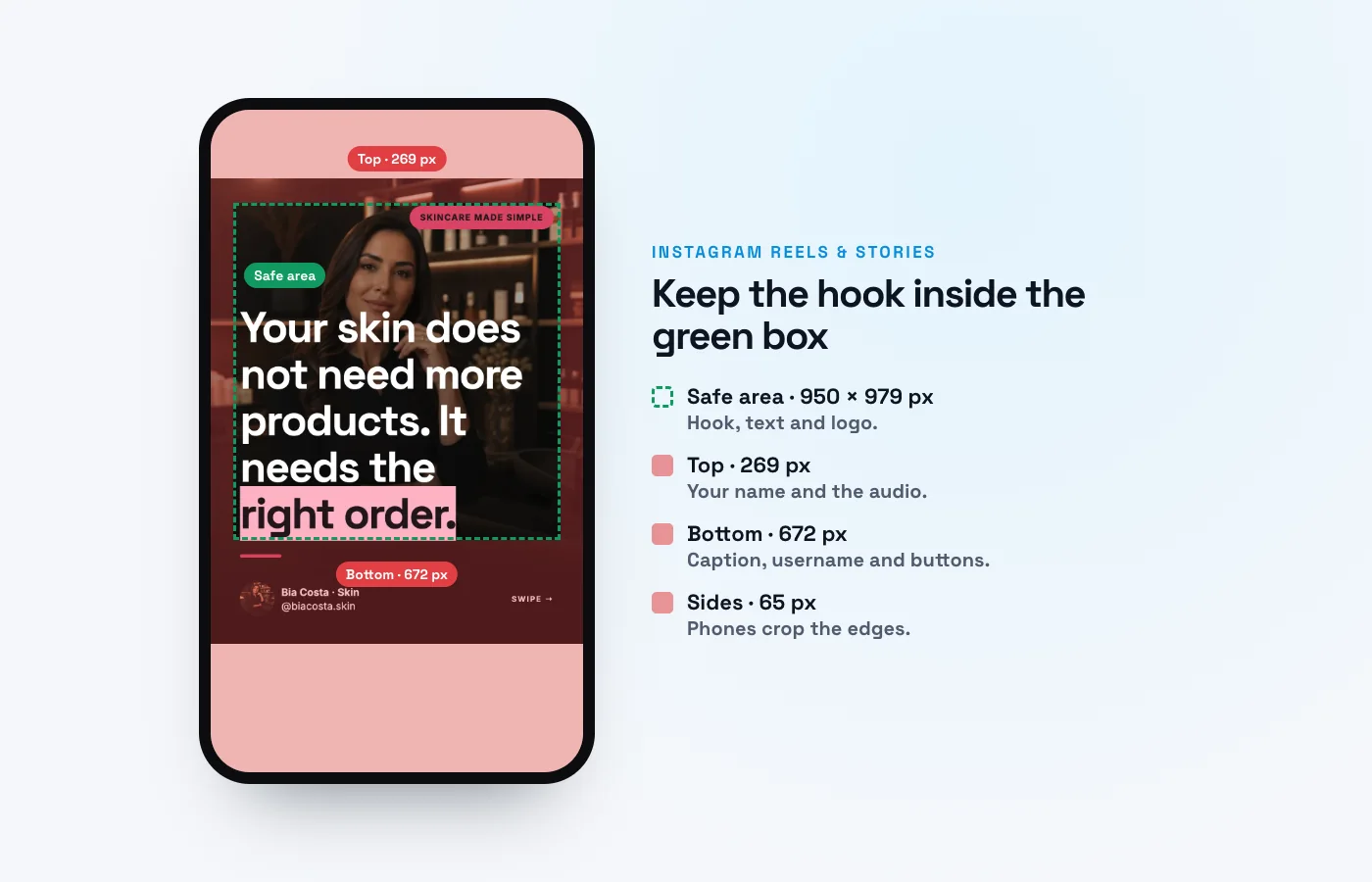
Meta's Ads Guide says to leave roughly 14% of the top, 35% of the bottom and 6% on each side of a Reels or Stories asset free from text, logos or key elements. On 1080 × 1920 px that is 269 px, 672 px and 65 px, which leaves a safe area of 950 × 979 px. The guidance is worded "consider leaving", so treat it as a strong recommendation.
The biggest area is the bottom, where the caption, the username and the audio name sit. Put the hook in the upper middle, not at the bottom.
The details, the Story version and a template PNG are on our Instagram safe zone template page.
TikTok
TikTok publishes its safe zone as downloadable template files for ads. We measured the In-Feed Standard template: 240 px at the top, 660 px at the bottom, 120 px on each side, and a column of icons on the right, 300 px wide, from y = 840 to the bottom. So the safe area is not a rectangle: below y = 840 only x 120 to 780 is free.
TikTok also says the safe zone depends on the format and the caption length: the longer the caption, the smaller the safe zone. For photo posts, each photo is a full-screen slide, so keep text away from the bottom and the right edge on every slide.
The numbers, the variants with an anchor and an overlay are on the TikTok safe zone template page.
YouTube Shorts
Google's help page for vertical video ads links an official safe zone template with overlays, call-to-actions and buttons marked. On 1080 × 1920 px its margins are 288 px at the top, 672 px at the bottom, 48 px on the left and 192 px on the right.
For regular Shorts, YouTube's Help describes in-app visual guides that show where elements like the like button, comments and video description might appear, but it gives no numbers. So the ad template is a reference, not a YouTube rule for regular Shorts.
More on the YouTube Shorts safe zone page.
LinkedIn video
LinkedIn's help page for video says to keep the edges (top, bottom and sides) of your video free of key elements, text and logos, and shows a guide image on a 1080 × 1920 px frame. LinkedIn does not publish numbers for 4:5.
LinkedIn accepts aspect ratios from 1:2.4 to 2.4:1 for uploaded video, so both 9:16 and 4:5 work. See the LinkedIn video safe zone page.
One file for all apps
If you post the same vertical video on Instagram, TikTok and YouTube Shorts, design to the strictest value of each side:
- Top: about 290 px.
- Bottom: about 680 px.
- Left: at least 120 px.
- Right: at least 200 px, and keep the lower right corner clear (TikTok's 300 px icon column below y = 840).
That leaves a safe area of about 760 × 950 px. It is a conservative layout: a headline in the middle third of the frame, a face or product in the center, nothing important at the bottom or the right edge. Then check each app, because this is our rule of thumb, not an official number.
For the same idea on a slide in the feed, see the next section.
Carousels in the feed don't need a safe zone
A safe zone matters for Reels, Stories, TikTok videos and Shorts, where the app draws its interface over your design. A carousel in the feed does not have that interface on top of the slide. What it does have is a profile grid that crops the cover, and the platform's size rules. Our carousel sizes guide covers those, and you can write and design the slides in SuperCarousels: it writes and designs every slide from one idea, with text kept clear of the edges, and exports PNG, PDF and video. Create my carousel →
Common mistakes
- Text at the bottom. It is the biggest margin in every app.
- Using one app's numbers for another. They differ.
- Treating ad numbers as platform law. They are the closest official reference.
- Never testing on a phone.
- A headline on the right edge. TikTok and Shorts both cover it.
- Forgetting captions change the zone. TikTok says the longer the caption, the smaller the safe zone.
Related free tools
- Instagram safe zone
- TikTok safe zone
- YouTube Shorts safe zone
- LinkedIn video safe zone
- Instagram Reels cover size
- All free tools
FAQ
What is a safe zone on social media?
The part of a full-screen video or image that stays clear of the app's buttons, captions and names.
What are the safe zone margins for Instagram Reels?
On 1080 × 1920 px: 269 px at the top, 672 px at the bottom and 65 px on each side. They are Meta's guidance for Reels and Stories ads.
What is the TikTok safe zone?
In TikTok's In-Feed template: 240 px at the top, 660 px at the bottom, 120 px on the sides, and a 300 px icon column on the right below y = 840.
Is the Instagram safe zone the same as TikTok's?
No. Each app draws a different interface, and the numbers differ.
Is there an official safe zone for regular posts?
We found none with numbers for Instagram, TikTok, YouTube Shorts or LinkedIn. The official numbers are for ads, so we use them as the closest reference.
Do I need a safe zone for a carousel?
Not in the feed, where the interface is not on top of the slide. Do check how the cover looks on your profile grid.